


















🔥 Trending app discovery:
Pujie Watch Faces - Wear OS 4-
You May Like


Pujie Watch Faces - Wear OS 4-
Personalization
Ratings
Downloads
Age
Advertisement
Editor's Picks
App Review
→ SMART WATCH COMPATIBILITY
This version is not compatible with the Galaxy Watch 7/8, the Galaxy Watch Ultra and the Pixel Watch 3. And will not be compatible with Wear OS 6 or newer watches. If you have a Wear OS 6 watch, check out:
Pujie Watch Faces - Wear OS 6
→
https://play.google.com/store/apps/details?id=com.pujie.watchfaces
This version is fully compatible with all WearOS 2.x, 3.x & 4.x devices. Or watches which have been upgraded to Wear OS 5.
This includes the following:
• Samsung Galaxy Watch 4, 5 & 6
• Google Pixel Watch 1 & 2
• Fossil smartwatches
• Mobvoi TicWatch Series
→ ONLINE
https://pujie.io
Tutorials:
https://pujie.io/help/tutorials
Cloud Library:
https://pujie.io/library
Documentation:
https://pujie.io/documentation
→ INTERACTIVE WATCH FACE / LAUNCHER
Pujie Watch Faces allows you to assign custom actions to a huge number of possible tap targets. The Tap drawer, a panel with 6 tap targets and all your custom elements make up to unlimited assignable tap targets! It’s a watch face and launcher in one!
Choose from:
• The Calendar, Fitness, Weather view or The Tap Drawer
• Any installed watch or phone app or shortcut
• Tasker tasks!
• Watch or phone actions (volume, play/pause music, etc)
→ DESIGN
Design your own watch elements (watch hands, backgrounds, complications, custom elements) with the included watch element designer! Pujie Watch Faces has the most advanced watch face maker, supporting true vector graphics and images.
→ WATCH FACE LIBRARY
The watch face library is an online social library of watch faces and watch parts.
Read more:
https://pujie.io/library
→ WIDGET
Even when you don’t own a smartwatch you can use Pujie Watch Faces. Use the same app to create a home screen clock widget!
→ KEY FEATURES
All settings are available using the Pujie Watch Faces phone app. Some settings are available from the configuration menu on the watch.
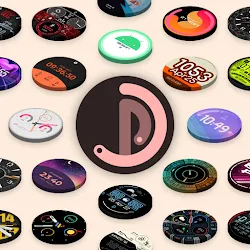
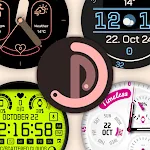
• 20+ watch faces to get you started
• Choose from 1500+ fonts
• Design your own watch elements
• Animated
• Tasker integration (variables & tasks)
• Start any watch or phone app
• Square, rectangular and round watches
• Calendar integration!
• Weather data, Celsius or Fahrenheit
• Phone and smartwatch battery status
• Multiple time zones
• Share your watch faces with others
• And much more
→ SUPPORT
!! Please don’t rate us 1-star, just contact us. We respond mighty fast !!
https://pujie.io/help
How do I install the watch face?
1 Wear OS 2.x & Wear OS 3.x: Download the watch app from the Play Store on the watch.
2. Long press your watch and choose Pujie Watch Faces as your watch face, or select it using the WearOS app.
How do I activate a widget?
1. Long press your home screen or go to the widget section in the app drawer (depends on your launcher)
2. Choose Pujie Watch Faces.
3. Design a new style, or choose one of your designs
4. Place and re-size to your liking
Disclaimer
1. General Information The information provided by MoboReview ("we," "us," or "our") on moboreview.com is for general informational and educational purposes only. All information on the Site is provided in good faith, however, we make no representation or warranty of any kind, express or implied, regarding the accuracy, adequacy, validity, reliability, availability, or completeness of any information on the Site.
2. Affiliate Disclosure (FTC Compliance) MoboReview believes in transparency. Some of the links on our website may be affiliate links. This means that if you click on the link and download or purchase an app or product, we may receive a small commission at no extra cost to you. This helps keep our website running. Regardless of affiliate relationships, we only recommend apps and services that we genuinely believe will add value to our readers.
3. Editorial Independence & Sponsored Content From time to time, we may receive free access to premium apps, software, or promotional items from developers in exchange for a review. We may also occasionally publish sponsored content. However, compensation never dictates our editorial content. All reviews, opinions, and ratings expressed on MoboReview are strictly our own and are based on hands-on testing and objective analysis.
4. App Changes and Accuracy The tech world moves fast. While we strive to keep our reviews as accurate and up-to-date as possible, app developers frequently update features, change pricing models (e.g., switching from free to subscription), or remove apps from the app stores altogether. MoboReview is not responsible for any discrepancies between our review and the current state of an app. We highly encourage you to verify the app’s features, pricing, and compatibility on the official App Store or Google Play Store before downloading or purchasing.
5. External Links Disclaimer The Site may contain links to other websites or content belonging to or originating from third parties. Such external links are not investigated, monitored, or checked for accuracy, adequacy, validity, reliability, availability, or completeness by us. We do not warrant, endorse, guarantee, or assume responsibility for the accuracy or reliability of any information offered by third-party websites linked through the site.
Advertisement
Pujie Watch Faces - Wear OS 4-


Popular Apps





















Related Apps





About Us
Welcome to MoboReview, an independent mobile app discovery and review platform.
We provide editorial content, app reviews, feature summaries, comparisons, and recommendations to help users discover useful mobile applications and games. Our goal is to make it easier for users to understand different apps, explore their features, and find applications that match their interests and needs.
MoboReview does not develop, distribute, or host mobile applications. We are not an app marketplace and we do not provide direct downloads of applications. When users choose to install an app, they are redirected to official third-party platforms, such as Google Play Store or Apple App Store, where downloads, installations, and related services are handled by the respective app developers and platform providers.
Our content is created for informational and educational purposes. We review and organize publicly available information about mobile applications, including app features, user experiences, functionality, and general usage information.
We aim to provide transparent, helpful, and independent content for mobile users around the world.