
If you are reading this at a desk, odds are you are currently slouching. Your shoulders are likely rounded, your neck is craned forward, and your spine is shaped like a question mark. We all know we do it, but "remembering" to sit straight lasts about thirty seconds before our muscle memory takes back over and we lapse right back into a painful slouch.
While wearable posture sensors that stick to your back used to be the default solution, they come with dead batteries, finicky adhesives, and high price tags. That is exactly why AI-powered computer vision apps have taken over the market. By leveraging your phone’s camera or your computer’s webcam, the latest generation of posture apps can actively analyze your alignment in real time and nudge you before back pain sets in.
Over the past few weeks, we tested the most prominent camera-based posture tracking apps on App Store, Google Play, and desktop. We skipped the basic, non-interactive interval timers and focused on what actually works in real-world environments: on-device privacy processing, accurate skeletal angle detection, and alert systems that actually change your behavior without driving you crazy.
Here are the four apps that genuinely deliver on fixing your alignment.
* Availability: App Store (Requires App Store 18.2 or later)
* Pricing: Free basic mode; Premium tier unlocks full features (includes a 7-day free trial followed by a monthly subscription).
The Reality Check
If you want to use your iPhone as a real-time posture monitor while working on your laptop, Posture Cam is the most streamlined native mobile app available right now. Developed by Appstack LLC, it converts your front-facing camera into a continuous tracking sensor using on-board AI.
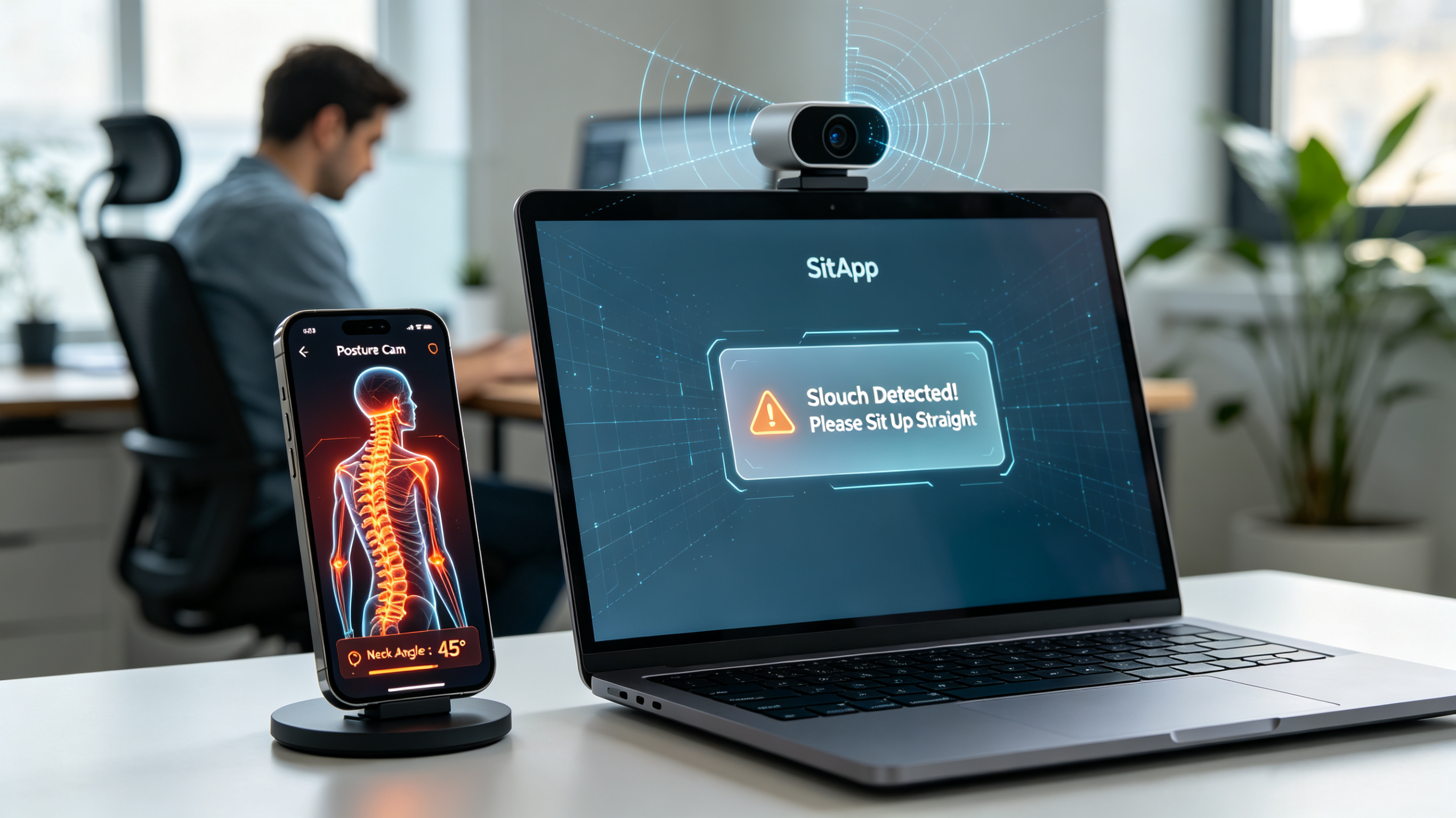
When we set it up on a desk, the app required a brief calibration process where we sat in our "ideal" upright position. From there, it stays active. The second your head slips forward into the classic "tech-neck" position, the app flags the deviation. What we appreciate most is that it offers subtle visual cues alongside optional haptic vibrations. If your phone is propped up next to your monitor, a quick vibration on your wrist or phone is a highly effective, non-intrusive reminder to sit up.
Pros
* Real-time monitoring runs entirely on-board the device—no camera feed is stored or sent to external servers.
* Dual visual and haptic alerts ensure you catch yourself slouching even during deep focus.
* Modern, polished App Store interface that doesn't feel clinical.
Cons
* Exclusive to App Store; requires relatively modern software updates (App Store 18.2+).
* Keeping your phone camera actively processing AI drains the battery rapidly if it isn't plugged in.
* Availability: App Store and Google Play
* Pricing: Free version available with basic evaluation tools; advanced subscriptions unlock medical-grade assessments and tracking.
The Reality Check
APECS (by Saneftec) isn't designed to watch you silently while you type out emails; instead, it is the ultimate camera-driven diagnostic tool to baseline your actual physical health. It uses advanced photogrammetric algorithms to analyze full-body photos taken from the front, back, and sides.
When we ran a full-body evaluation, we used its "Auto-position" mode, which maps structural landmarks across the neck, shoulders, and spine. The app generated a highly comprehensive PDF report outlining specific defects like Forward Head Posture (FHP) and asymmetrical shoulder heights. If you are working with a physical therapist or trying to track whether your gym routine is actively correcting a rounded back over months, this is the gold standard for tracking progress.
Pros
* Incredibly detailed clinical analysis, including index measurements like ATSI and POTSI.
* Cross-platform availability on both Apple and Google Play stores.
* Includes built-in privacy masking tools to cover your face on posture reports.
Cons
* It is a diagnostic tool, meaning it cannot monitor you live or alert you while you work at a desk.
* The advanced medical metrics have a steep learning curve for casual users.
* Availability: Google Play
* Pricing: Free to download; includes in-app purchases.
The Reality Check
For Google Play users looking for an active desk assistant, PostureGuard fills the void perfectly. It utilizes your phone's camera and an integrated machine learning model to track your sitting alignment on a stable surface.
During our testing sessions, we placed our phone on a small stand next to our desk setup. The calibration takes only a few seconds. When you inevitably drop into a slouch or tilt your head too close to your workspace, the app triggers a gentle vibration or light flash alert. It is simple, minimalist, and built strictly to handle the behavior-modification aspect of posture correction without forcing you to buy extra gear.
Pros
* Privacy-first design; all machine learning processing is local, meaning no images or data leave the device.
* Surprisingly battery efficient compared to older Google Play computer-vision apps.
* Straightforward, zero-fluff configuration that takes less than a minute to deploy.
Cons
* Google Play exclusive.
* Very basic feature set; it lacks the granular, deep analytical charts found on premium desktop alternatives.
* Availability: Windows and Google Play
* Pricing: Free basic plan (perfect for testing); premium access starting via a low-cost upgrade model.
The Reality Check
While mobile apps are excellent, the harsh reality is that most slouching happens while looking at a laptop or monitor. SitApp handles this perfectly by bypassing your phone entirely and utilizing your computer's built-in webcam.
We tested SitApp's on-device AI system (referred to as the "Droid") over several long writing sessions. Calibration takes roughly ten seconds: you show the camera your ideal upright posture, and then intentionally show it your typical slouch. It sits quietly in your menu bar, processing numbers instead of raw video to preserve privacy. The moment your alignment cracks, a gentle, customizable visual or vocal nudge pops up in the corner of your screen to correct you.
Pros
* Operates natively on your workstation monitor where you actually need the correction.
* Excellent analytical dashboard highlighting exactly when your posture breaks down during the day.
* Highly customizable, non-annoying alert patterns.
Cons
* Requires keeping your laptop webcam unobstructed.
* Requires a desktop environment; cannot track your posture while on the move or sitting away from your computer.
Choosing the right option completely depends on how you work. If you spend your entire day bound to a computer monitor, SitApp is the absolute best solution. It puts the posture coach right on the screen you are staring at, requiring no phone placement or battery management.
If you prefer a purely mobile, standalone setup to keep your phone running as an alignment monitor next to your keyboard, App Store users should lean into the clean UI of Posture Cam, while Google Play users will find exactly what they need in the local, privacy-first tracking of PostureGuard.