

Remote work sounds flexible until your calendar starts spanning three continents.
Your designer is in London, your client is in Los Angeles, your engineering team is in Tokyo, and somehow you are expected to schedule a meeting that does not ruin everyone’s sleep schedule. One wrong conversion can mean missed standups, awkward “sorry, I thought this was tomorrow” messages, or late-night Slack notifications that quietly destroy your work-life balance.
Most people start by manually googling time differences or relying on mental math. That works right up until daylight saving time changes in one country but not another, or you accidentally book a meeting at 2 AM for somebody else.
That is where dedicated time-zone apps become surprisingly valuable.
Over the past few weeks, we tested the most popular Android-friendly world clock and time conversion apps under actual remote-work conditions: international meetings, airport layovers, late-night scheduling, and fast-moving client calls where you need answers immediately. We focused on three things above all else: accuracy, usability, and speed. A good time-zone app should reduce mental load, not add more of it.
Every app below is actively maintained, available on the Google Play Store, and genuinely useful for people working across multiple regions in 2026.
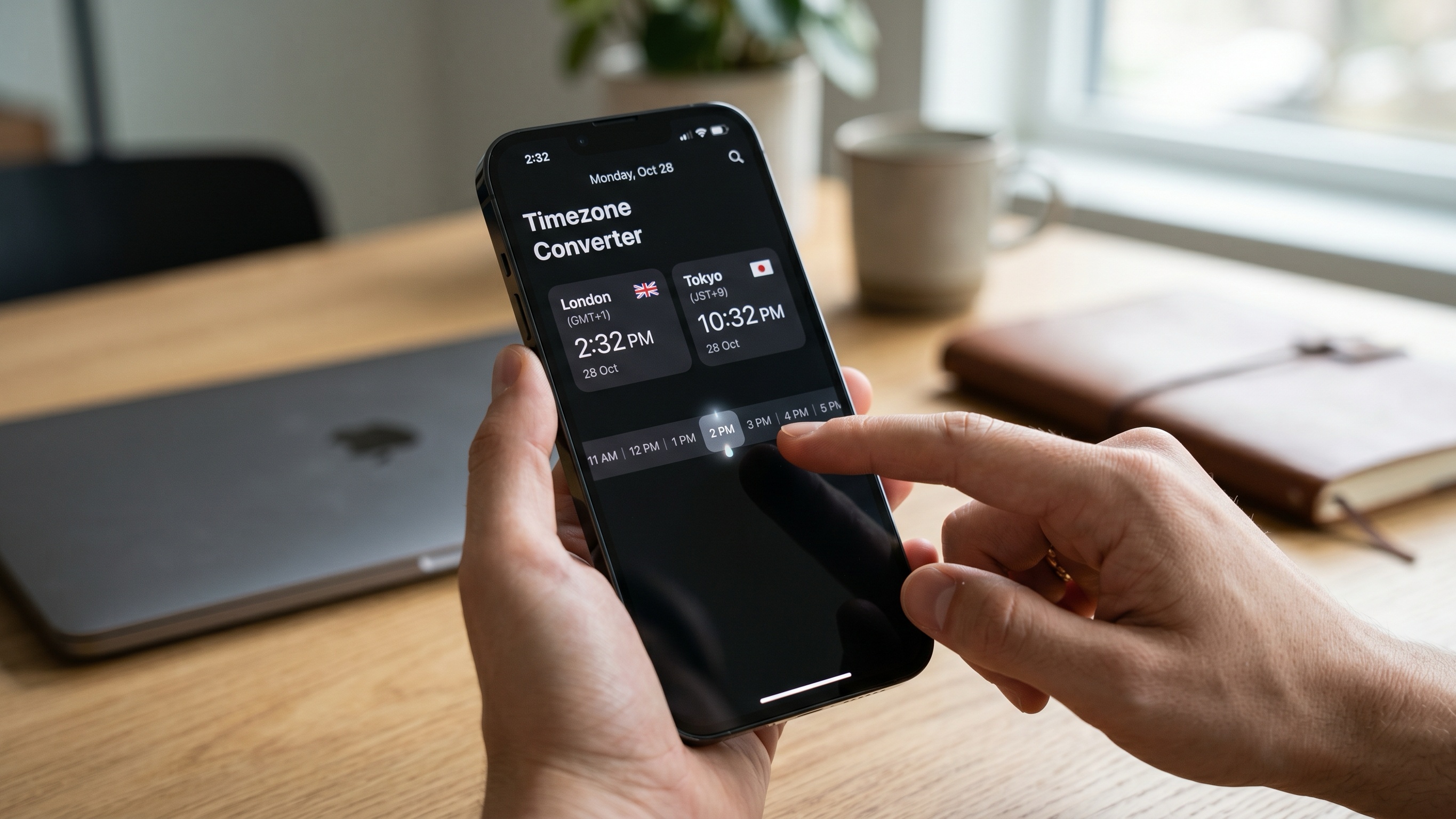
Some productivity apps try to do far too much. Timezone Converter succeeds because it does exactly one thing—and does it exceptionally well.
The app is built around a simple swipeable timeline interface. Instead of manually entering times or navigating through endless dropdown menus, you drag horizontally across the screen to instantly see how hours shift between locations.
During testing, this ended up being far faster than traditional input-based converters. If you suddenly need to know what 3:30 PM in New York looks like for someone in Tokyo or London, a quick swipe gives you the answer immediately.
That simplicity becomes extremely useful during real workdays when you are bouncing between Slack messages, calendar invites, and Zoom links.
The app also deserves credit for staying lightweight. There are no social features, no bloated dashboards, and no aggressive ads interrupting the experience. It works offline, handles daylight saving changes automatically, and feels remarkably polished for such a focused utility.
Customization is another nice touch. You can rename locations with labels like “HQ,” “Client,” or “Engineering Team,” which makes scanning your schedule much easier than staring at a long list of city names.
The only real downside is that the search system occasionally struggles with smaller municipalities. In most cases, you will need to search for the nearest major city instead.
Extremely fast swipe-based timeline conversion
Clean, distraction-free interface
Works offline with minimal battery usage
No intrusive ads or unnecessary features
Smaller cities can be harder to locate
Limited advanced scheduling tools for large teams
World Time Buddy—usually shortened to Time Buddy—has been a favorite among distributed teams for years, and after testing it again in 2026, it is easy to see why.
Rather than showing isolated clocks, the app displays multiple time zones in a vertical side-by-side grid. Each row represents a city, while the columns represent overlapping hours across the day.
That design sounds basic, but it is incredibly effective in practice.
During testing, Time Buddy made it much easier to identify the small windows where everyone is simultaneously awake and working. Instead of mentally comparing clocks, you can visually scan the grid and instantly find overlap zones for meetings.
The app also handles daylight saving transitions very well. It warns users ahead of upcoming DST shifts, which is genuinely helpful for international teams coordinating recurring calls.
Another underrated feature is how easy it is to share meeting ranges. You can select a block of hours and quickly export or copy converted times directly into your calendar or messaging app.
That said, the free version is somewhat restrictive. You can only track a handful of locations before needing to upgrade, and the interface is optimized primarily around full-hour scheduling rather than unusual half-hour offsets like India Standard Time.
Still, for managing multiple clients or globally distributed teams, it remains one of the strongest tools available.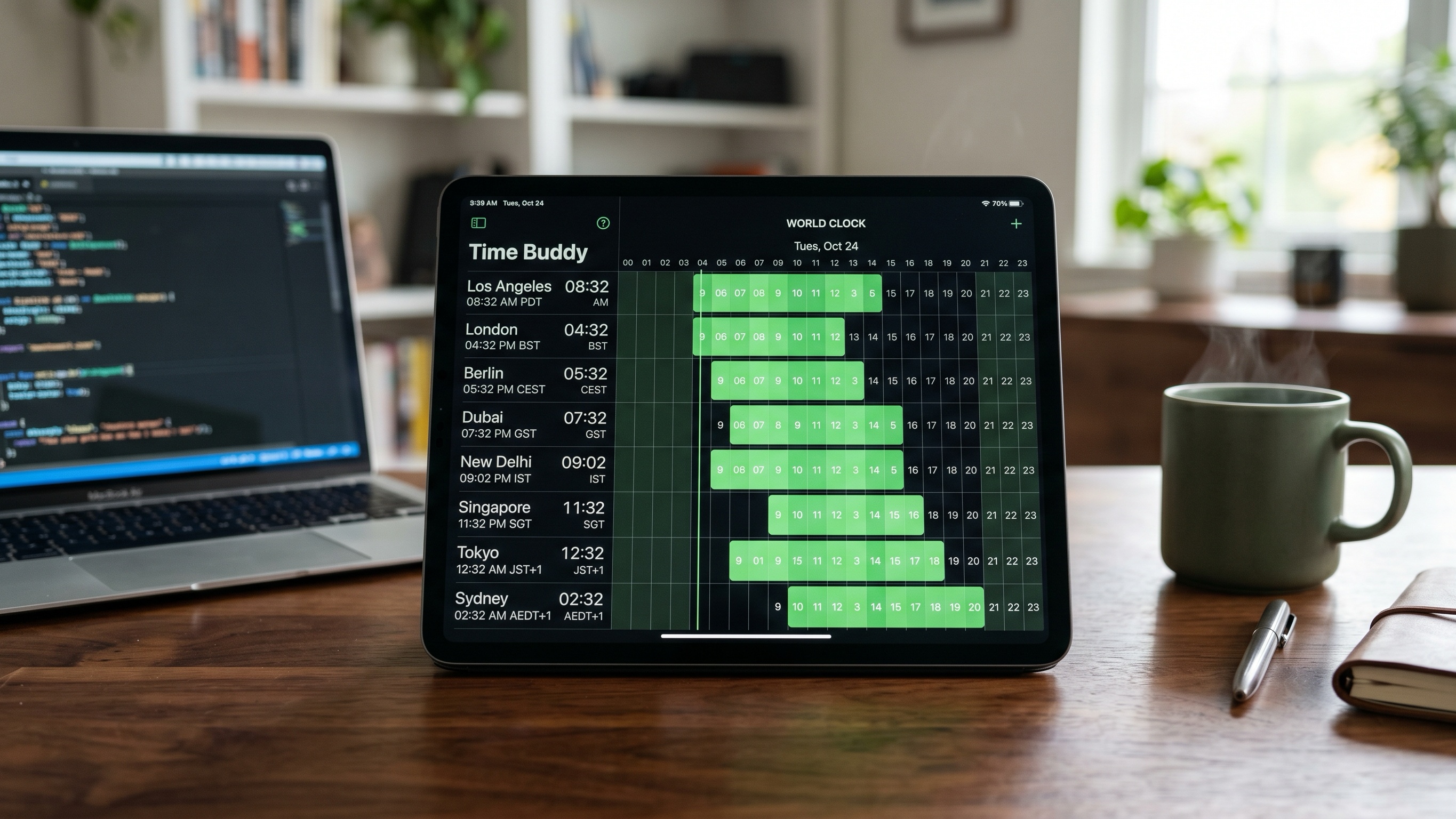
Excellent visual overlap scheduling
Very helpful daylight saving notifications
Easy calendar exporting and sharing
Great for distributed remote teams
Free version limits tracked locations
Less elegant for regions using half-hour offsets
Interface can feel dense at first glance
Horzono feels more like a professional scheduling dashboard than a basic world clock app.
At first glance, the interface can look intimidating, but it offers an impressive amount of control for people managing complicated schedules across several countries.
The standout feature is custom availability mapping. Instead of assuming everyone works standard 9-to-5 office hours, Horzono lets you define actual working windows for every location. You can specify early shifts, hybrid schedules, flexible hours, or client availability ranges.
Once configured, the app generates color-coded timelines that make overlaps and conflicts easy to understand visually.
During testing, this became particularly useful for coordinating with teams across Asia, Europe, and North America simultaneously. Rather than simply comparing time zones, the app helped identify realistic collaboration windows based on actual work hours.
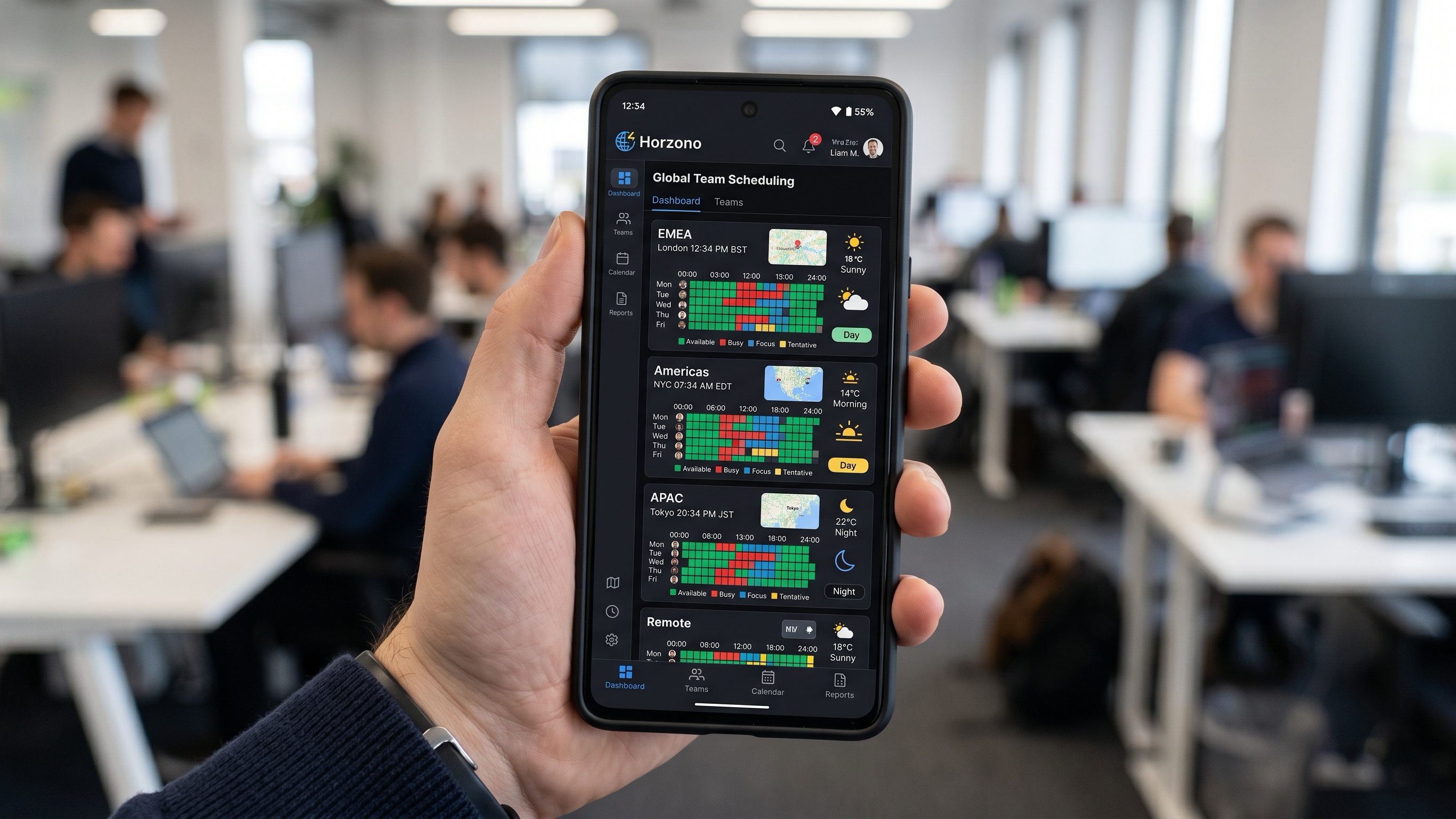
Horzono also layers in contextual information like local weather, sunrise and sunset times, and day/night visualization. That might sound unnecessary, but it helps avoid accidentally scheduling meetings during someone’s midnight hours or early mornings.
The tradeoff is complexity. Compared to minimalist alternatives, Horzono requires more setup and feels heavier overall. On lower-end Android devices, animations and maps occasionally slowed down slightly during testing.
But for managers or coordinators handling global operations, the extra detail can be genuinely valuable.
Powerful availability customization
Excellent visual overlap system
Useful contextual details like weather and daylight
Works offline after setup
Steeper learning curve
Interface may feel overly technical for casual users
Slightly heavier performance load on older phones
Some people do not want to constantly open an app just to check another time zone. World Clock: Time Converter is ideal for those users.
Its biggest strength is its widget system.
During testing, the app worked particularly well for quick-glance scheduling directly from the Android home screen. Instead of repeatedly opening your clock app, you can pin multiple cities, maps, and conversion tools directly onto your device layout.
One feature that stood out was remote-region alarm support. Unlike standard phone alarms, which operate strictly in your local time zone, this app allows you to create alarms tied to another city’s local time.
That becomes surprisingly useful if you regularly support overseas deployments, server maintenance windows, or international launches.
Privacy-conscious users will also appreciate the app’s approach to data collection. The app operates with minimal tracking, no aggressive advertising, and strong offline functionality.
The downside is that the interface occasionally feels cluttered. The app includes a lot of optional metadata—weather, population information, map layers—that casual users may never need.
Still, if your workflow depends heavily on widgets and instant visibility, this is one of the best Android options available.
Excellent Android home screen widgets
Useful remote-region alarm system
Strong offline functionality
Privacy-friendly design
Interface can feel busy
Some information feels unnecessary
Long city names occasionally display awkwardly
The best time-zone app depends largely on how complicated your remote workflow actually is.
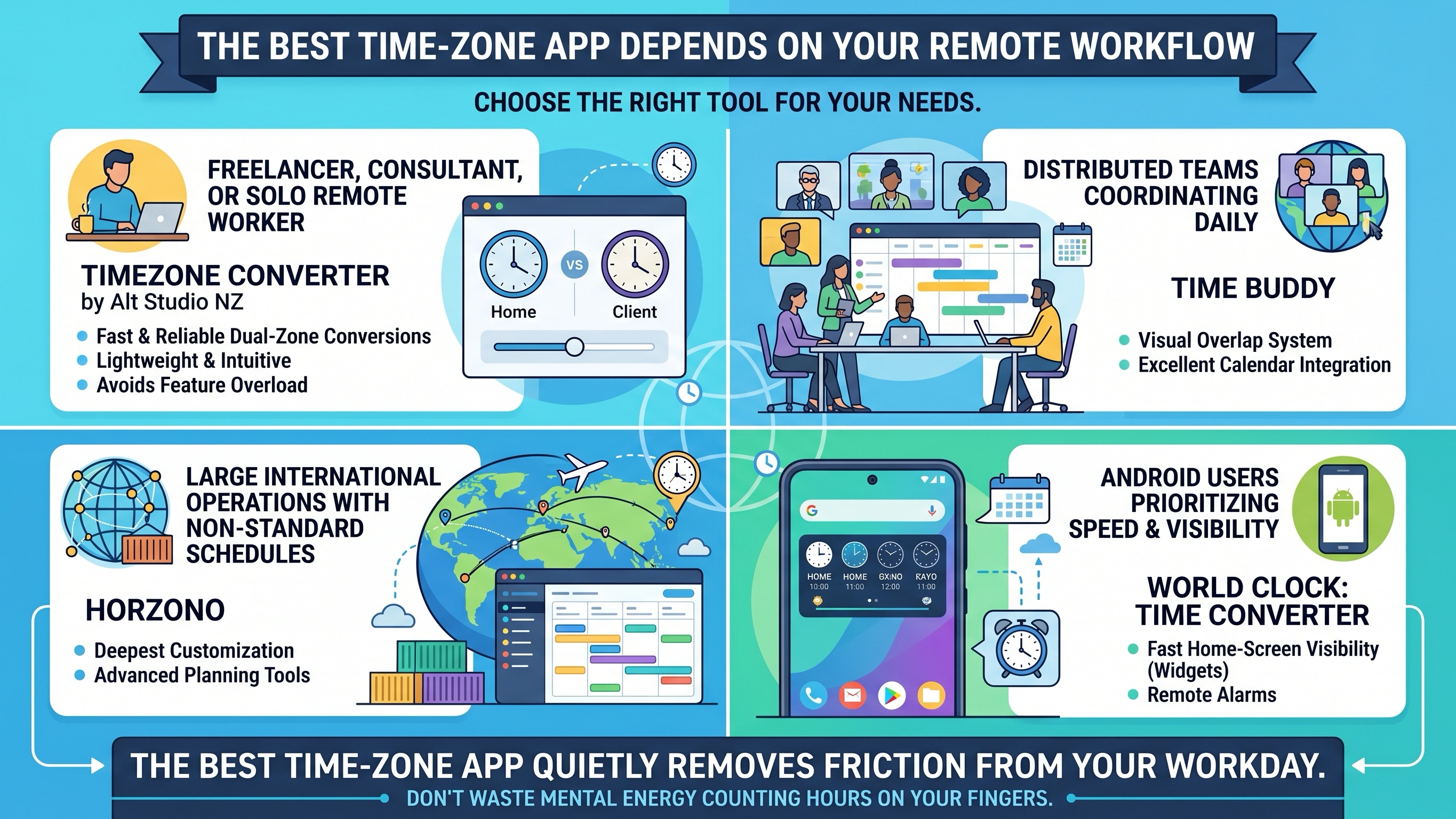
If you are a freelancer, consultant, or solo remote worker who simply needs fast and reliable dual-zone conversions, Timezone Converter by Alt Studio NZ is probably the easiest recommendation. It is lightweight, intuitive, and avoids the feature overload that makes many productivity apps exhausting to use.
For distributed teams coordinating across multiple regions every day, Time Buddy remains one of the best scheduling tools available thanks to its visual overlap system and excellent calendar integration.
If you manage large international operations with non-standard schedules, Horzono offers the deepest customization and planning tools.
And if your priority is fast home-screen visibility and remote alarms, World Clock: Time Converter is a strong choice for Android users who want immediate access without constantly opening apps.
At the end of the day, the best time-zone app is the one that quietly removes friction from your workday. Because when your job already spans half the planet, the last thing you should be wasting mental energy on is counting hours on your fingers.